Read a video's real numbers on YouTube with Lens
VideoCore Lens is a free Chrome extension. It puts one measured number on every video: how it did against what that channel's comparable uploads actually did. No account needed.
Search YouTube as normal
On a channel row Lens adds a health score out of 100 and the channel's typical views per video. The score is calculated by VideoCore from public numbers, not a YouTube metric.

Open a channel's Videos tab
Every thumbnail gets a multiple. 1x is a typical video for that channel; green is above its normal, red below. Above the grid, the channel bar: health out of 100, its four pillars, typical views, openings that win, and the biggest lever.

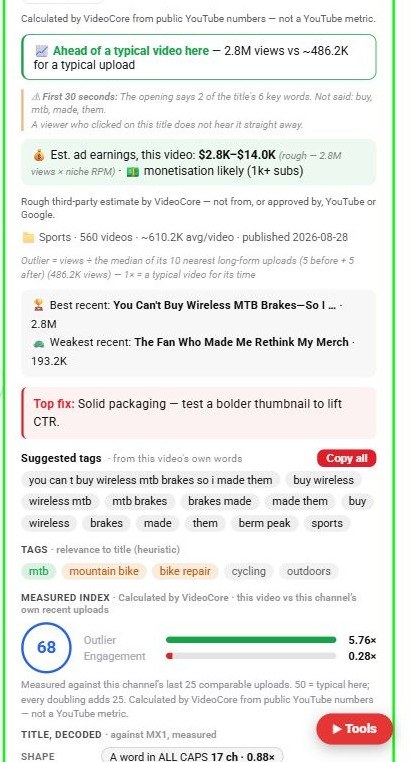
Open a video and read the panel
The top says the multiple and the rank among the channel's last 25 comparable uploads. Below it, the live stats from YouTube, then the rates VideoCore calculates from them: views an hour, engagement, like rate and views per subscriber.
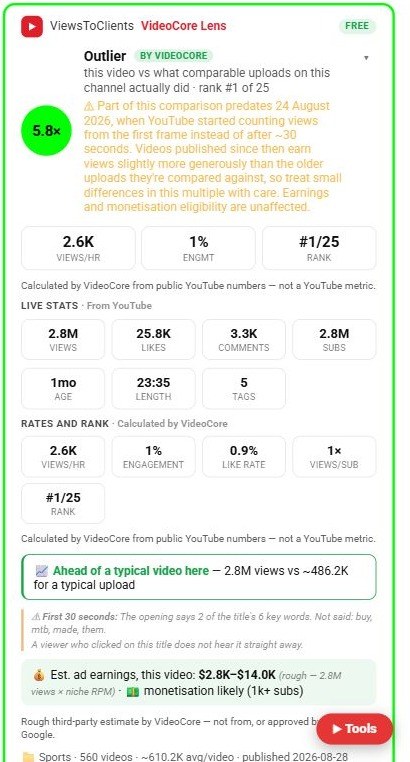
Scroll the panel for the fix and the title read
Top fix is the one change to make first. Below it, the title is decoded against your field: which shapes winners in this niche actually use, and the share of measured videos in the field that beat 2x.